

Jigsaws
Sounds
Video
Custom Shows
vba code
NaviSlides
Games for teachers
Bullets
Triggers
Security
Flash Cards
Multiple Instances
PowerPoint 2007
Mail Merge
Random events
Animation
Hyperlinks
Set spellcheck language




Media Triggers in PowerPoint 2010 - 2016
In versions from 2002 it has been possible to trigger animation when an object is clicked. Version 2010 takes this a step further, you can insert timed triggers in Video and audio so that the animation happens at a certain position in the playback. This is very cool but it's not that instinctive to use.
Here's how ...
First insert the media, we.ve used an audio track but it's very similar with a video. Press PLAY or RIGHT click and choose preview. When you get to the trigger point press the PAUSE button. To fine tune the position use ALT SHIFT LEFT ARROW and ALT SHIFT RIGHT ARROW which will step forwards or backwards in 1/4 second steps.
Now make sure you have the Playback TAB selected and click "Add Bookmark"
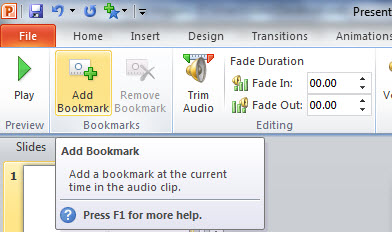
Add the object to be animated or select it if it's already there and then add the animation. In the custom animation pane double click the entry and in the Timing tab set a trigger of "Start effect on play of". If you have several triggers choose the correct one. NOTE if you have NO bookmarks this option is greyed out.
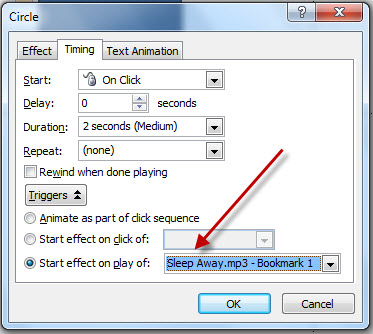
There you go, the effect will happen when the media plays to that point!
Gotcha's
This will only work in 2010 or later. If you play the presentation in 2007 or earlier the animation will be lost.
It can be difficult to insert the bookmark exactly where you want it.
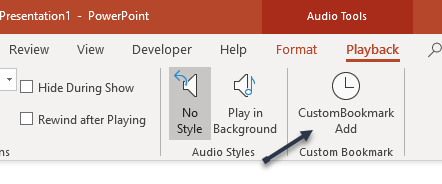
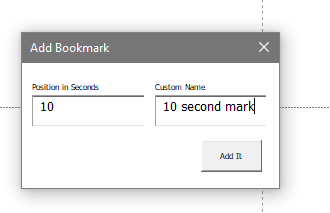
Here is a totally free AddIn that allows you to specify the exact postion AND give the bookmark a custon name. Free but no support.
Simply download and run with PowerPoint closed. When you next open PowerPointand select a sound / video file (Not online video) you should see a new button in the Playback Tab.
Articles on your favourite sport
Free Microsoft PowerPoint Advice, help and tutorials, Template Links
This website is sponsored by Technology Trish Ltd
© Technology Trish 2007
Registered in England and Wales No.5780175
PowerPoint® is a registered trademark of the Microsoft Corporation