

Jigsaws
Sounds
Video
Custom Shows
vba code
NaviSlides
Games for teachers
Bullets
Triggers
Security
Flash Cards
Multiple Instances
PowerPoint 2007
Mail Merge
Random events
Animation
Hyperlinks
Set spellcheck language



How to Add a Ribbon Entry That Runs a Macro in 2007
In earlier versions quite a lot of code was needed to add a button or menu to run macros in an add in. In 2007 though it is much simpler the method may be unfamiliar.
Here's how to write a simple add in in 2007 with a ribbon entry. NB this is just the basics!
First write your code:
Open the vbe with Alt f11 and insert a module. Add the simplest code in the world!
Sub Hello()
MsgBox "Hello!"
End Sub
Feel free to write your own code if you wish!!
Now save as a pptm file.
The easiest way to add xml to a pptm file is to use "Office 2007 Custom UI Editor" it's free and you can get it here:
Now run the editor and use it to open your pptm file. You just need to add the xml to the window and save and all is done.
Here's the xml for this simple project:
IF YOUR MACRO ISN'T CALLED HELLO change the onAction
NOTE IN XML CASE is important
<customUI xmlns="http://schemas.microsoft.com/office/2006/01/customui">
<ribbon>
<tabs>
<tab id="myTabAddIns" label="My Name">
<group id="CustomGroup1" label="My Stuff">
<button id="Custombutton1" onAction="Hello" showImage="true"
imageMso="AcceptInvitation" size="large" label="Run This Macro" />
</group>
</tab>
</tabs>
</ribbon>
</customUI>
Copy and paste it in and save. NOTE THE COMMENT ON NEW VERSION BELOW!!!!
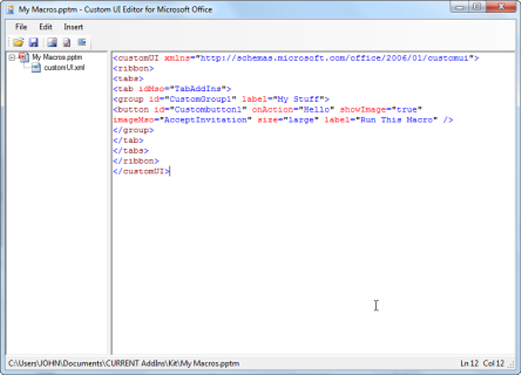
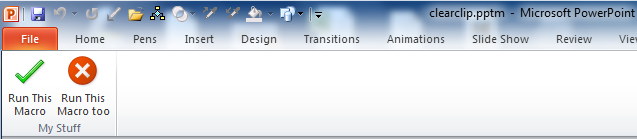
When you open the pptm you should now have a new entry in the AddIns tab that will run the macro. Save as a ppam Add In and the ribbon entry is included. You will need to load the AddIn just the first time and after that it will always be available
Change the XML
Change the label text to alter the ribbon heading
Change onAction text for a different macro
More buttons?? After the line <button id ................/> add a similar line with a different button id and onAction Macro.
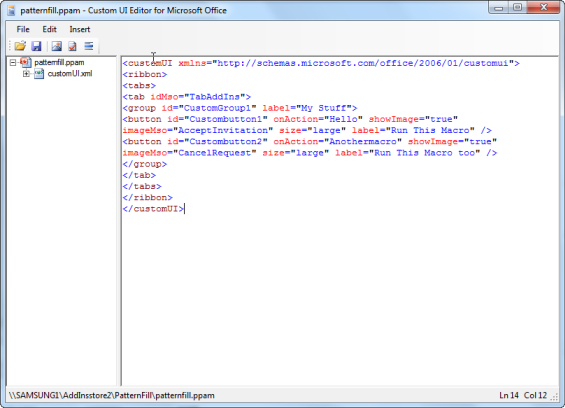
To make the entry in the Home Tab use TabHome instead of TabAddIns
The image "Accept Invitation" is a green tick
CancelRequest is a red X
This is of course just the start try googling for Ribbonx or Custom UI Editor
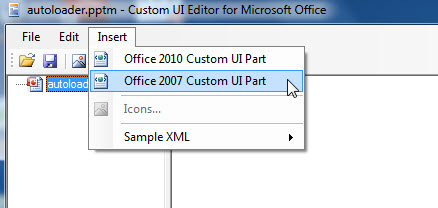
NEW VERSION OF CUSTOM UIEDITOR
There's a new version which supports the new xml features in 2010. If you are used to the old version you may be caught out by the extra step needed to select 2007 or 2010 BEFORE pasting or writing the XML. Note for most standard users 2007 will work in both.
COMPLETELY STUCK? You might like this free "Make an AddIn" kit. Please note this comes without support.
Articles on your favourite sport
Free Microsoft PowerPoint Advice, help and tutorials, Template Links
This website is sponsored by Technology Trish Ltd
© Technology Trish 2007
Registered in England and Wales No.5780175
PowerPoint® is a registered trademark of the Microsoft Corporation